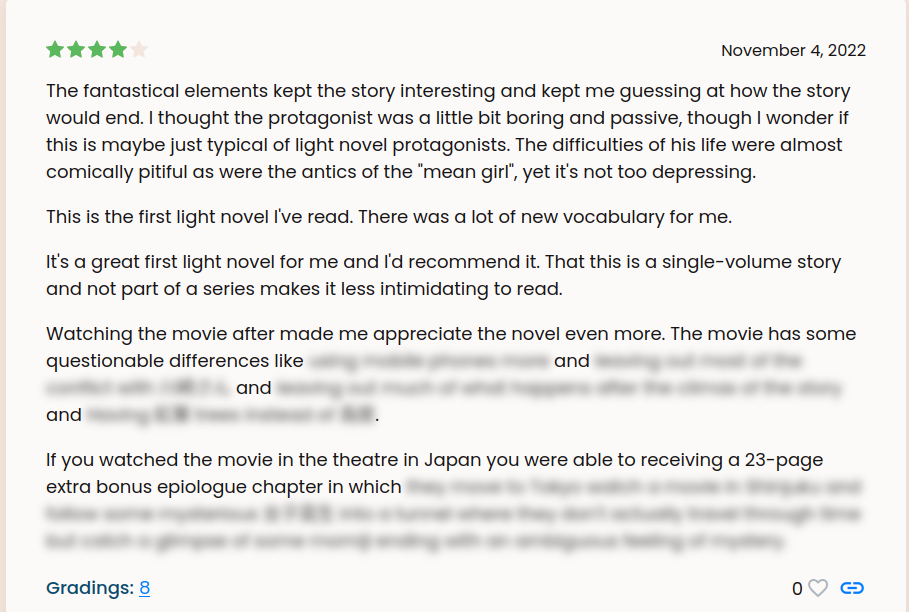
Hi! A few other users and I just noticed that the spoiler tags don’t work on firefox, but only on a book’s page (the one listing all the reviews), if opening the individual reviews from the permalinks, it works just fine however.
For instance, on 夏へのトンネル、さよならの出口’s page, looking at mori’s review, it looks like this on firefox:
We tested on chrome, and it seems to work just fine so it seems to be a firefox only issue (I cannot try on safari as I don’t have a mac - EDIT: someone tried safari with browserstack and it seems to work correctly here as well).
Yeah, this was discussed in another thread but I think it’s good to have a proper bug report. There is a suggestion that this is perhaps a bug in Firefox (@mic reported it as one), but who knows how long it might take for that to get looked at, fixed and rolled out, so dealing with it on the Natively side is probably faster.
Man, I really hope that this bug gets fixed at some point. I don’t want to switch browsers just for Natively, but I also don’t want to know that e.g. someone dies at the end of a story, followed by an almost mocking </Spoiler>
I switched to Chrome bc of this (months ago), and the issue still persists on Firefox. I try to be conscious of it when writing reviews, but there’s only so much you can do (and in the first place I really don’t think it makes sense to tailor reviews to a software bug)