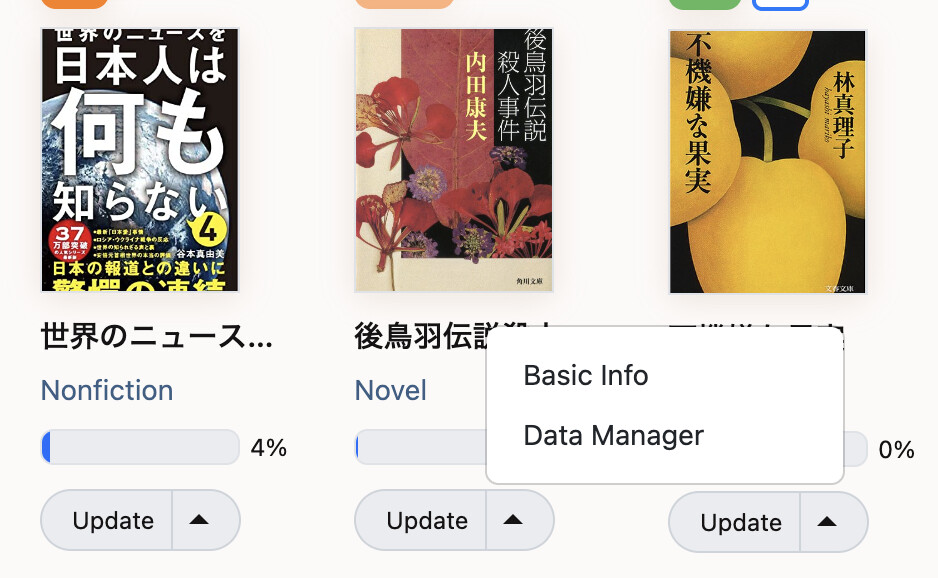
When editing a book (see image below) it would be nice if the popup remembered when you last used Basic Info or Data Manager. Right now it always defaults to Data Manager, which I find annoying since I never create individual reading sessions.
Approved. There will be some instances (edit pencil on reading session activity) where I’ll still default to the data manager, but you’re right that particular place could go either way.
@nikoru Any chance this one can get looked at in the near future? Either making it remember previous selection or just making Basic Info the default. It is basic for a reason, so it’s weird that it’s not the default.
I.e. with one click you can open the “update progress” dialog, and with two clicks you can open one of the other two dialogs. (And the dropdown to switch between dialogs is gone.) So to get to the Basic Info dialog you now need two clicks (compared to three clicks in the current prod version).
We picked the progress update dialog as default because we thought that updating your progress would be the action people perform most from the dashboard? If this assumption is incorrect, I would either consider making “Basic Info” the default if that’s what people use most often, or maaaaaybe make this configurable like in the browse page.
Technically, the “update progress” is way more basic with its one entry field though
It depends on where you’re clicking from, right? The screenshot from the OP is on a book/show page (not the dashboard), and I think that edit button should default to basic info. In that place, I use it exclusively when I add a book or show that I started on a previous day (and forgot to add) and have to immediately correct the start date.
I’m sure other places make sense to default to the data manager (like the episode list for a show), but for that one location I only ever want to fix the start date. I’m curious if anyone ever uses that edit button to use the data manager.
Oh You are absolutely right. It basically says “edit the start and end dates” and then it should take you to the dialog that allows you to edit the start and end dates.
Will look into it.



 You are absolutely right. It basically says “edit the start and end dates” and then it should take you to the dialog that allows you to edit the start and end dates.