Still the same link for me.
1 Like
Did you clear cache? Usually with this kind of apps/js, it could be a cache problem if it’s already fixed.
Edit: disregard, brandon replied below  .
.
2 Likes
I actually just realized I didn’t push it out when I sent my last message… Fixed now though!
4 Likes
Also on the book search page, it doesn’t remember my preferences as it used to. No matter how many times I select “Series” for the Series Results filter, it always defaults back to “One volume only” the next time I open the search page. It didn’t use to be like this and it’s quite frustrating. It deceives me into thinking that an entry is a standalone volume, even if it is part of a series.
3 Likes
The sort and series drop-down options have disappeared from browse. 
1 Like
… and fixed
Edit: I’ve also fixed:
- Add content tags doesn’t immediately update [@eefara]
- Add content tag on volume and immediately click through to series causes error [@nativelearner]
4 Likes
Was this also happening with book clubs being added? Noticed some errors on the 老女的少女ひなたちゃん pages just after getting the confirmation that it had been added. It did resolve itself after a few minutes though.
@brandon Just to ask… how bad does a release have to be for you to decide to rollback and try again later? This one in particular has had a lot of bugs, which is why I ask. Personally I would have just rolled back within a day once I saw how many issues there were. 
8 Likes
Heh. You may be right. I definitely tend towards the ‘just go crazy and fix everything up’ rather than rollback. The situations I roll back are when:
- there are bugs that will corrupt data
- there are bugs that will cripple SEO
- there are bugs which prevent users from doing daily tasks / critical tasks
- there are severely annoying bugs which I won’t be able to fix soon (trip or something)
The first two were never a concern. The latter two I didn’t think occurred either, but there’s maybe some disagreement on that.
However, this isn’t really a normal release either. There were a lot of processes and functionality to test out… and a lot of it was around how things operated on production. Could I have rolled out a server and set up a staging environment and tested it all there? Yeah I could’ve… but that’s a bit of work and not really something I would use in the future. It would’ve been slower, but i’d understand if some would’ve preferred that.
I will say too that a lot of these bugs have been over the course of multiple releases… it’s not just one release.
But yeah, you’re right it’s been very buggy, I know. Looking back on it and knowing what I know now, probably would’ve took some more time on the search release, definitely.
But I honestly don’t really expect another release like this anytime soon. Overhauling a frontend framework is kinda a nightmare.
9 Likes
No. I think that’s just our admin tarek fixing it up 
1 Like
Just need to get another part-timer to help with QA.
4 Likes

When searching for Recently Added books on the German side and clicking the little series expander, the entire page reloads. If I scroll down the series is now open, but the page reload is pretty freaky. Same thing happens if I close the series expander.
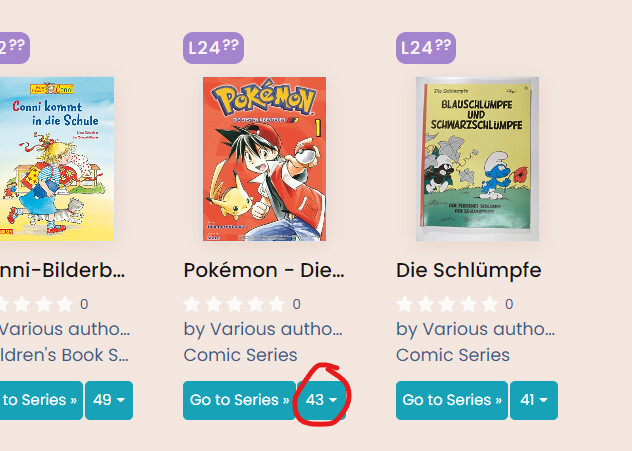
Edit: looks like it’s just happening in general on the book search page, regardless of language or search filters.
The more I see of this the more I agree with this brandon.  You’ve been doing a great job running around squashing bugs, but the sheer number present in commonly used workflows makes me worried.
5 Likes
@brandon If it doesn’t have any effect on the data as you mentioned, how hard would be to run this on beta.learnnatively.com and other big changes before pushing them into production?
It would also give you more time to squash stuff without having to rush.
6 Likes
Another one; not sure if it’s been reported. I was on this page noting a different bug (unrelated to this process), and wanted to go to the Korean side. I clicked the flag button and selected Korean (Beta), but nothing happened; I wasn’t brought to my Dashboard or anything. Same thing happened when I tried other languages.
After some experimentation, seems like it happens regardless of language or whether you’re looking at an individual book or series. Just being on a book/book series page doesn’t let me switch languages.
4 Likes
It’s doing the NGINX 404 pg thing again
3 Likes
Thanks for the note, fixed!
3 Likes
The Natively tab icon doesn’t appear while on browse pages.
1 Like
Hmm, it does for me  .
.
What browser are you on?
In other news, I fixed yesterday:
- Fixed: Make sure series collapse settings are stored [@バギ ]
- Fixed: Series dropdown doesn’t work [@eefara]
- Fixed: Language toggler doesn’t work [@eefara]
Today, I’ll try to fix the exclude my library,fileter, blurbs default issue and a few other things.
I did also try and improve the speed of your user data being loaded. I may be able to speed up the book page as well @HopeWaterfall
5 Likes
Chrome…