Reactivity issue in privacy settings

Description of your request or bug report:

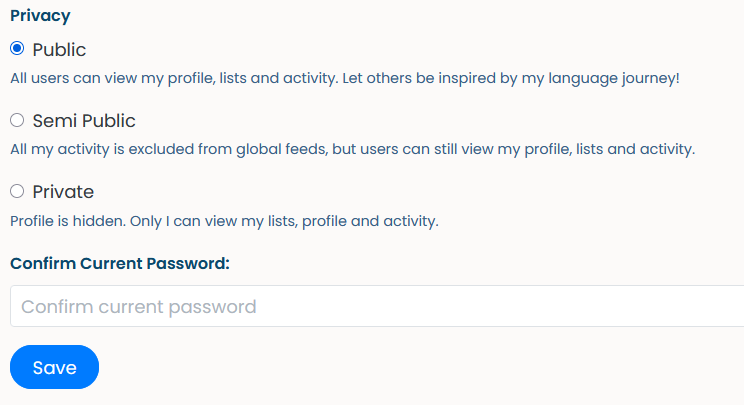
Clicking the radio buttons on the privacy settings doesn’t visibly update their state. The value is correctly updated, though. Performing another action on the page causes the state to update and the button to appear checked.

Clicking the text, however, either of the label or the description, results in the radio being visibly selected. It is only the radio button that does not work as expected.

Using Firefox 146.0.1.

--

After clicking the radio button in front of “Semi Public”, “Public” remains the visible selection:
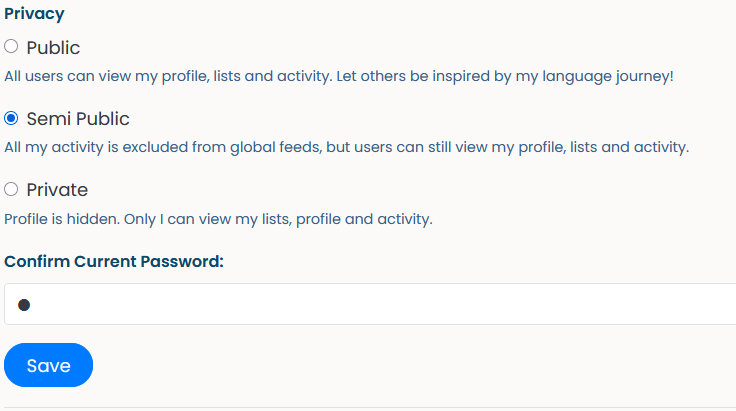
After performing another action, in this case entering a character in the password field, “Semi Public” becomes selected:

Trello link: (leave in blank)

I tried to reproduce this and couldn’t. On my end the radio box updates instantly. I’m on Brave 1.86.139

2 Likes

same behaviour as OP on Edge Version 143.0.3650.139

(TIL that this is called a radio button.)

4 Likes

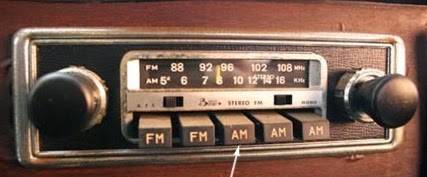
It was a more intuitive name back when people still remembered 70s and 80s car radios with physical “one button at a time” behaviour…

6 Likes

I can’t be the only one that have tried pressing two of those at the same time trying to create chaos :rofl: .

Also I had one of those that you actually had to press two, for a casette recorder, you had to press PLAY and RECORD.

7 Likes

:handshake:

7 Likes

I do not miss that lol… Well then again, we still do it whenever we take mobile screenshots :thinking: So I guess it hasn’t totally gone away

6 Likes

Is this still happening @mathew?

I can’t reproduce with LibreWolf 148.0.2-3 anymore.

It still happens for me, yeah. I’m on the latest version of Firefox (148.0).

1 Like