It’s funny that you say that. I probably do about 80/20 mobile/desktop with Natively and whenever I’m on the desktop site I always think, wow, this is so much nicer here 
Maybe it’s exactly because I spend more time on the mobile site? Grass is greener kinda thing.
6 Likes
Aside from what everyone said, I miss having some kind of notifications (opt-in). If I’m wishlist/reading/watching a series, and a new book or episode, it would be handy to get a notification ala Discourse.
And while at it, it would be nice to have Discourse notification integration, for those who want to enable it.
5 Likes
Oh wow, this is all very amazing, thank you all!
Just to be very clear, the first version of the new dashboard will be exactly identical in look and layout as the current one - sorry if you’re disappointed now 
There will be some things that should improve just because of the different technology, e.g. the “forgetting filter settings” and maybe also the language switching confusion (not yet 100% sure on this one though).
Also, I can already see some quick wins we could implement right after the dashboard migration is done (e.g. the more detailed filter options for the activities). Some others need some time, and we would need to discuss them a bit more in-depth (among us and with you). Yet others go against the current idea of “one current language” (notably showing all books on the dashboard), and we need to see how we can fit this in or whether we want to change the general way in which Natively is working (maybe at least for the dashboard). Maybe the languages could be more like a filter setting rather than a toggle on the dashboard? We need to look at the consequences of such a change and think about how to handle them.
Already looking forward to putting all these great improvement suggestions into Natively! 
12 Likes
Omg, PLEASE share this, looks amazing.
5 Likes
You’ll have to search & replace my username with your own and if you plan to use with spanish you’ll have to tweak a little.
I just made it with ChatGPT so no guarantees & use at your own risk! 
6 Likes
Jesus Christ YES. I hate when people wishlist a whole series and that’s all I see on my global feed. 
Agree. Personally, I’d like it if my in progress actually took up more space on the homepage in general. Sometimes I browse the activity feed, but when I’m on the dashboard it’s usually because I’m updating progress on a book. It’s always seemed a little weird to me that it’s smaller than everything else.
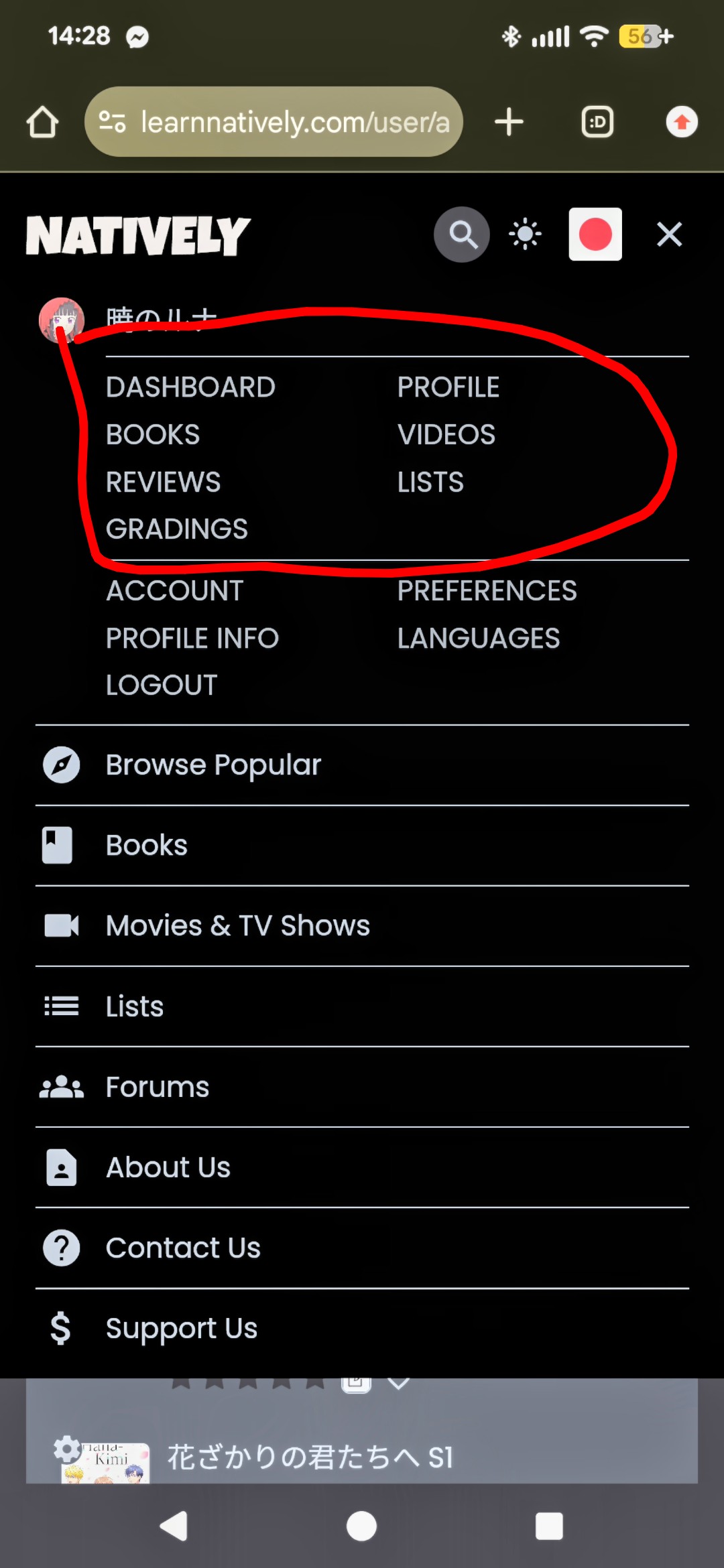
I also feel like this bit could just be taken off of the dashboard entirely. Your icon is in the top right already. The information for what account you’re logged into should probably be in there when you click on the icon. I feel like that’s the most standard for websites.

6 Likes
It used to have the email there, which triggered me beyond limits and I had a tampermonkey script remove it until @brandon removed it. But yes, I agree that box is unnecessary. Both settings link (the thing next to ACCOUNT) and View my Profile are available in the corner, also it feels more intuitive to go there for account related actions
Related PR:
Don't display account info or repurpose the Account info section
5 Likes
Thanks for all the hard work & the update - really appreciate how much working y’all are putting in 
That certainly makes sense, but how does it play with url history? Will the history do be updated say each time you open a new book? Same question for Ctrl+click / “Open in new tab”. I’ve run into a lot of apps where you just can’t open things in a new tab, and losing that functionality would be a major disappointment to me.
Also does it play well with “Duplicate Tab”? Like if I duplicate a tab once or twice and start doing similar but different things in them, is it gonna get weird? Or they won’t be affected by each other?
People adding typing and tests always makes me happy 
On mobile, I can’t pinch zoom on Dashboard, My Books, My Videos, etc. Fixing this should just involve removing a meta tag iirc.
I wish the desktop also had the personal links, and I wish the mobile menu included the Stats page
There are some issues with Dark Mode still:
Filtering Dashboard feed to Video fails to exclude book gradings (something which I don’t even need/want to see if the first place)
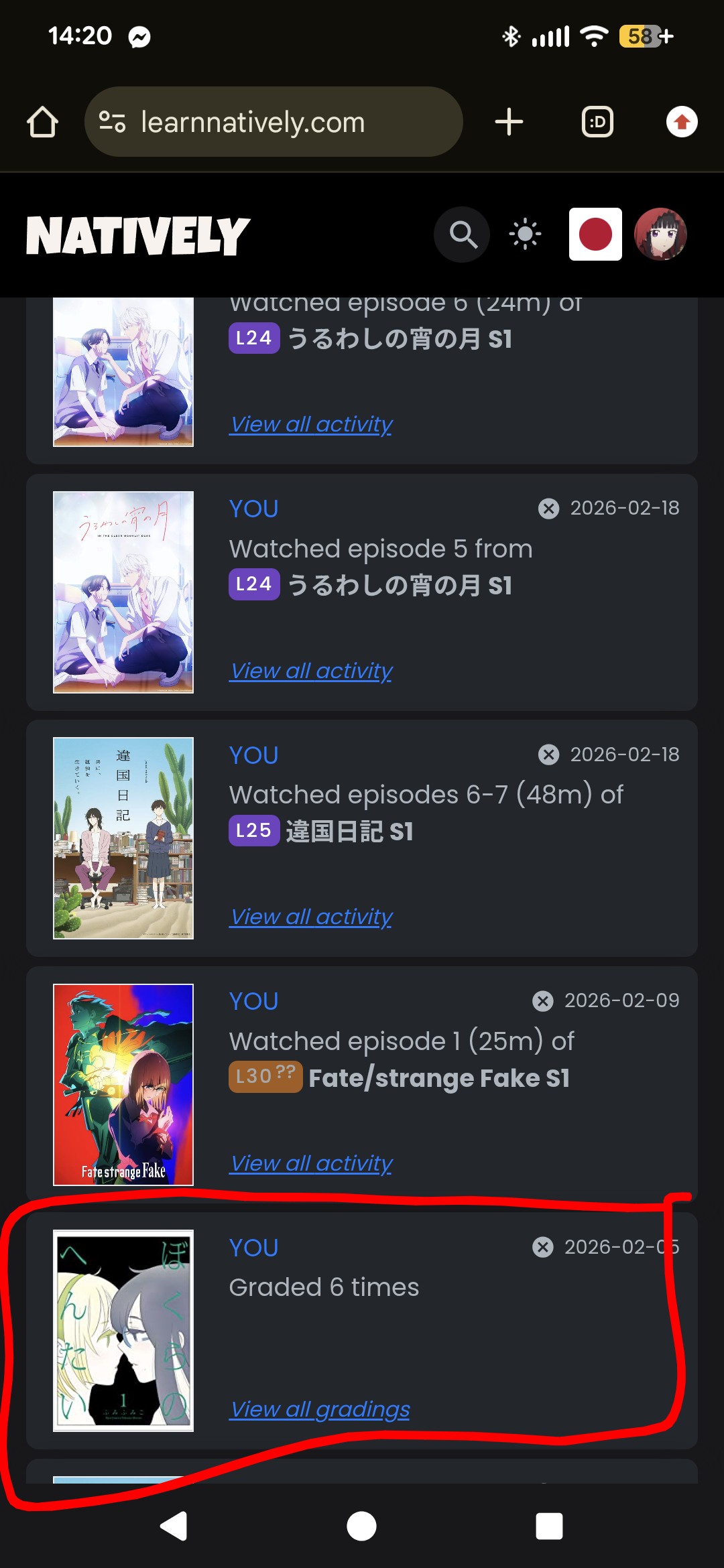
I know some users have expressed wanting to filter out adult content or explicit covers from their dashboard in the past (or at least have that blurred).
It sounds like it might make sense to create a separate thread for Filtering enhancements, once you’re done with this stage of things?
I’d be happy to
This drives me crazy too… But otoh a new user clicking on them would probably prefer to start from the top 
Same, but like I think it’s just the nature of desktop being more versatile/functional than mobile due to things like space + keyboard + mouse, easier mutli-tabs, etc
7 Likes
I don’t know that this would count as a dashboard problem, but I would love to be able to filter by number of pages.
Also, I second the comment about us not being able to see the percentage we’re at from a book’s page, and only from the dashboard, it should be both.
And a small bug as well. When I update my progress on a book, I’m not sure if it’s only for books I’ve just started or any book, but if I don’t go into progress update and instead I update from the initial pop-up, it doesn’t go into the activity feed, neither the general one nor the one for that book.
Also, it seems that there are recurrent bugs with adding books through Yes24. Right now it works with the ISBN but not from the link (I’m on my phone, so idk if it would work from a computer link). And I know issues with Yes24 were fixed a few weeks ago, and again a week or two before that, so idk what’s up with Yes24 but clearly there’s something going on
4 Likes
That’s firmly on my secret bucket list as well, together with sorting by pages
Summoning @brandon on this one as he is the Yes24 wizard!
6 Likes
Thanks for the shout! Moved that discussion to a bug report.
4 Likes
I guess my improvement request would be regarding the data manager and updating reading progress. I hope I’m requesting this in the right place
The dialogue when you press “update” on a book you are currently reading is very minimal, it seems like it can only add reading sessions that happened today. I don’t know a way to add a reading session I did yesterday, apart from adding a session, then editing that session in a different dialogue, the data manager.
Also, if I have a book set to percentage, I also want to see the percentages in the Data Manager (or at least be able to fill in percentages when adding new reading sessions, not having to calculate the pages manually). The data manager also not really being intertwined with the progress update dialogue is kind of weird to me. When I add sessions via data manager (e.g. “read to page 50") and then update the progress to page 80, the entry in the data manager shows “read from 0-80”, not “50-80”. Which probably stems from the fact that adding a new session in the data manager doesn’t update the “pages read” at the top of the “data manager” and neither the “current page” under “Basic Info” or “Progress Update”, and therefore not the percentage on the dashboard either. These are probably already documented elsewhere, but I’m not really actively following all the forum discussions or bug reports
When adding a session via the data manager, it would also be nice to have the last page read/starting page prefilled, and maybe today’s date preselected as well?
Also, when I add a new session in the data manager and put 30 minutes for the minutes and nothing else, I want it to understand that that means “hrs=0”. I get an error that hrs is empty if I try to add it that way, and it gets me almost every time. Currently it has the greyed out 0 already filled in in the hrs field, so either prefill that with a normal 0, or make the hrs not required.
Additionally, when adding a new reading session there are three buttons: Close, Save, Delete, that feel like they are in a non-standard order? I usually expect “Save” being the right-most button. (The colors have so far saved me from accidentally deleting entries, at least).
When adding a new session, Close and Delete have the same effect. An alternative would be to just have “Discard” and “Save”. When editing existing sessions you obviously need to distinguish between Close and Delete; maybe a small delete / trashcan icon in the top right could be an alternative?
Requests for the future:
I like being able to choose between pages and percentages; maybe there could be a third option added, “Kindle” pages or bookwalker / ebook pages? I know you can edit the page numbers, but I don’t want to change the page numbers to 2000 when it’s a 500 page book and have crazy “has read pages 1500-1800” activity updates. I also want to keep the reading speed graph data accurate and comparable across books. I want to keep the “pages read” data true to the actual paperback count, but I want to enter the kindle page number I’m currently on.
Maybe just adding a decimal to the percentage would make me happy, since rounded percentages feel really imprecise.
Also maybe there is a better way to deal with 文庫本 and 単行本 editions? I try to record all my pages in 文庫本 equivalents to have comparable reading speed; ideally I would want both page numbers pulled from Amazon and then have a dropdown to choose which page number I want to use. But most people probably don’t care about page numbers in such great detail
Okay and one last thing: I want the calendar to automatically fill in a reading day if I have recorded a reading session / reading activity on one of my books.
(In the far future, maybe even displaying pages read on the calendar, or maybe color-code the calendar like an Anki heatmap? And also pages read over time stats, not just days read or hours recorded)
10 Likes
+1 to this
Fwiw if you’re reading on Kindle, it calculates percentage differently anyway (as does Bookwalker). Personally I’d prefer to leave the percentages as is though. Asking the decimal would make it messier/take up too much space on mobile imo
I also think this seems like an obvious thing to connect, in the future
10 Likes
oh yes this is sooooo annoying ! I typically only use this during readathons usually but yes definitely fix this!!
hmmm I enter the decimal and it has always stayed there …from what I have seen it appeared to make some difference when I would only read a small amount
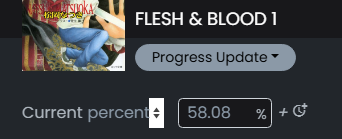
as far as percentages go though and using various percentages to pages, it is never perfect but it is pretty close so I don’t worry about it too much, but sometimes it would be nice (though probably not practical) to somehow marry the % to page numbers better. I know I’m close to the end of this chapter by ~5 ttsu pages and I know the actual physical chapter page because the bookclubs publish the side by side lists…but when I compare the actual page in the activity feed, I know it’s not directly mapped and behind by 5-6 physical pages. It’s so minor it’s not a huge deal but it does mildly annoy me 
But if there was some way (not easy to program I’m sure) to marry the % to the chap page numbers and then you could use that for whatever zoom level on whatever e reader you had. Would only work though if you didn’t switch ereaders…if you are reading on kindle then switch to ttsu and back… This seems like a nightmare to program and then with republished and sometimes 2 or 3 versions of the book…the trade off of being off by a few pages … meh not a big deal once the book is done finished=finished anyway.
4 Likes
My only caveat with this might be that it’s pretty easy to find a use case where this would be annoying instead- say you habitually read at night before going to bed, and you do all your page updates the next day. So maybe just have a setting/toggle somewhere to enable/disable the behavior?
7 Likes
Picking when the time rolls over would be nice (as someone who routinely reads after midnight but count days until I go to sleep) would also be a great feature.
13 Likes
That’s good to know, I’ll try that out! I don’t mind the inconsistencies that much, as long as they are consistent in their inconsistency ,but sometimes I forget how I entered the page numbers last time (did I round up a page or round down? How did I round the time spent reading, since my tracker records seconds as well?), so I guess the inconsistency lies with me at least I only read on Bookwalker so at least that is consistent.
True, I didn’t think of that! If there was an easier way to put the date read when recording pages, maybe that would solve that, if you could set the pages to the day before? Since I also like to log pages read for the day before if I read after midnight. But making it a setting would work as well, of course.
5 Likes
I second this as I don’t count next day til I physically go to sleep (unless I don’t sleep at all that day).
4 Likes
When it comes to progress updates, half of the time I forget that the preset is pages, not the percentage. Could it be possible to have a toggle somewhere so we can choose what comes first? Or at the very least have a message pop up if we put decimals with pages, something like, this is measuring pages, not the percentage, are you sure this what you meant to do?
Because I’m obviously not reading 23.59 pages of a book, that just cannot make sense. But if I’m not careful, it’s still logged without issues as 23 pages, when it’s clearly meant to be a percentage.
Slight rant but I feel like this happens to me at the very least every other time I update my progress, because I’m usually marking down percentages
6 Likes
In the code I can see that there is the option to work with pages or percentages! But I haven’t figured out yet how this can be toggled
My excuse is that I don’t use Natively for recording purposes… So if you find out how this can be toggled, please let me know
5 Likes
